


Automation
How to connect website leads to Telegram in 10 minutes (workflow overview)
Mar 3, 202616 min
Automation
Many businesses capture leads through website forms, landing pages, and chat widgets, but the critical KPI is response speed. If your sales team reacts slowly, high-intent leads often contact competitors first. In this guide, we build a production-ready n8n workflow that sends instant Telegram alerts and keeps CRM data clean.
Email-based lead alerts are often missed, delayed, or buried in noisy inboxes. This creates a gap between lead submission and first contact, which directly hurts conversion rates. Teams also struggle with fragmented data when lead details are manually copied into CRM systems.
Automation closes the response-time gap by routing lead data instantly to channels where teams are active. It also enforces consistent data validation before records reach CRM. Instead of relying on manual checks, teams get predictable handoff and faster qualification cycles.
Minimal architecture: Website Form -> Webhook Trigger -> Data Validation -> Lead Scoring -> CRM Create Contact -> Telegram Notification -> Follow-up Scheduler -> CRM Update. This architecture supports both speed and governance because each node has a clear purpose and fallback behavior.
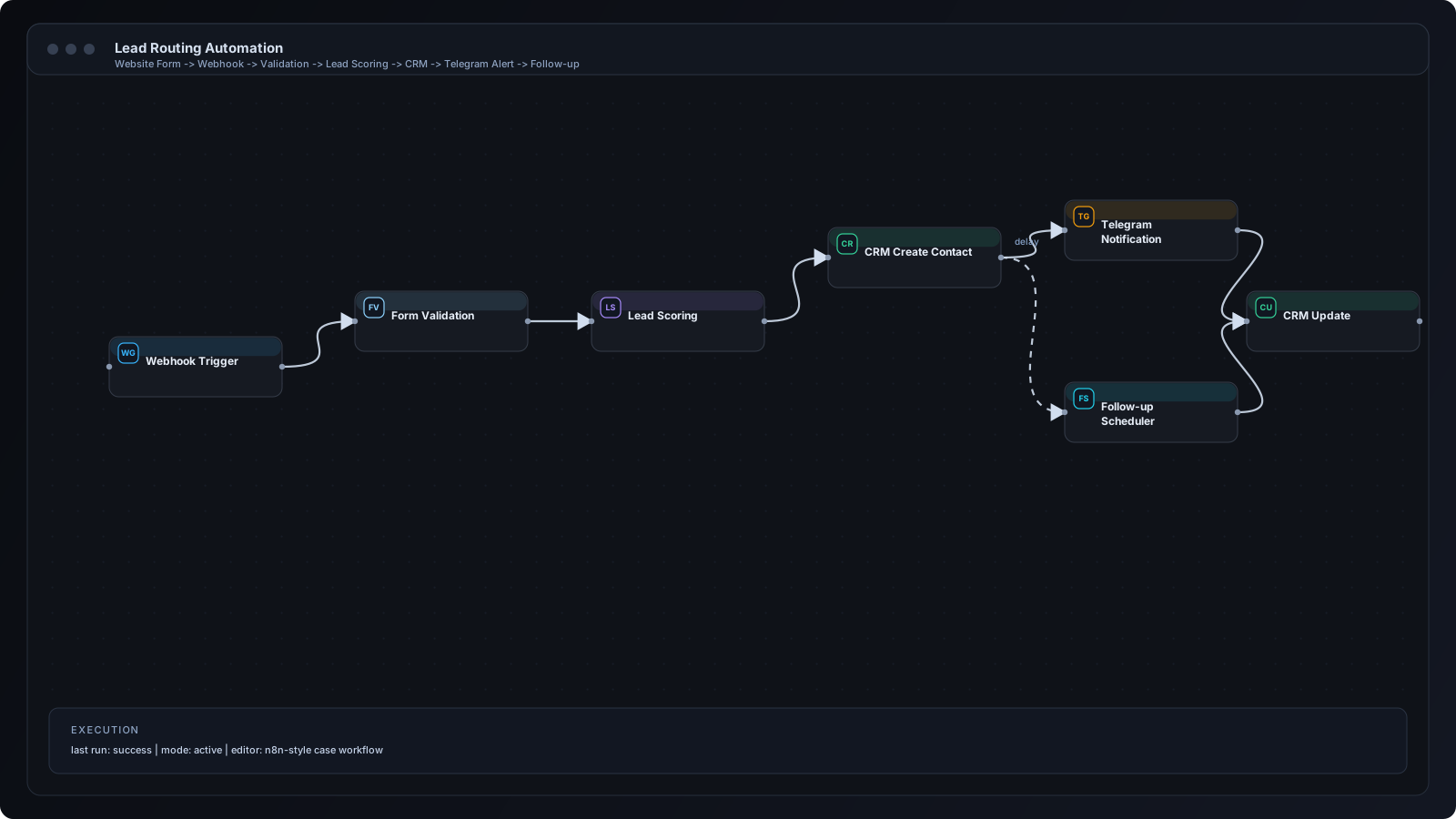
Step 1: Create a webhook endpoint in n8n and secure it with signature validation. Step 2: Configure your website form to POST payloads to that endpoint. Step 3: Validate required fields (name, email, phone, source) and reject malformed records. Step 4: Normalize payload keys so CRM mapping is deterministic. Step 5: Upsert contact/deal data in your CRM. Step 6: Send a structured Telegram alert including source, intent notes, and owner routing. Step 7: Start a follow-up timer if no sales action is detected. Step 8: Update CRM status after first response.
Webhook Node receives the submission event. Set/Function nodes format and normalize payloads. IF nodes perform validation and branch invalid data to error logs. CRM nodes upsert records safely. Telegram node sends rich alert messages. Wait and IF nodes handle delayed follow-up checks and escalation.
Real estate agencies for listing inquiries. Performance marketing agencies for campaign lead routing. Consultancies for strategy call applications. B2B SaaS teams for demo request triage. Local service businesses for inbound booking intent.
No validation layer leads to dirty CRM records. Missing deduplication creates duplicate contacts and confused ownership. Unstructured Telegram messages force manual interpretation. Teams also forget follow-up automation, leaving warm leads untouched after first alert.
Add lead scoring and clear owner assignment in the same workflow. Standardize alert format with concise context and action steps. Track response-time SLA as a measurable KPI. Configure backup notification channels for mission-critical lead sources.
Route leads by region, service category, campaign source, or deal size instead of one shared channel. Use queue patterns for burst handling during ad campaigns. Add segmentation and automated nurture branches for low-intent submissions. Integrate with HubSpot or Pipedrive to keep pipeline state synchronized.
Never expose raw webhook URLs publicly without verification controls. Validate payload signatures and limit accepted request origins. Store credentials in encrypted secrets and avoid logging full personal data. Define retention rules for execution logs and comply with local privacy obligations.
Q: How long does this workflow take to implement? A: A focused version can be launched in one day; production-hardening usually takes 3-5 days. Q: Can it handle high lead volume? A: Yes, with queueing, retries, and idempotent CRM upserts. Q: Do I need coding skills? A: Basic no-code setup is possible, but custom logic benefits from light scripting. Q: Can Telegram notifications be customized? A: Yes, by source, lead score, owner, and urgency level.
Automating website lead notifications is one of the fastest ROI wins in operations automation. With n8n, teams can move from slow inbox workflows to instant structured alerts and consistent CRM updates. The result is faster response, cleaner data, and higher conversion confidence.
n8n Workflows
AI for Business
Automation