

AI for Business
AI-assisted support: human approval workflows that stay safe
Mar 3, 202615 min
AI for Business
Support teams want faster response times, but fully automated replies can create quality and compliance risks. The strongest model is AI-assisted drafting with explicit human approval before sending. This article explains how to design that workflow in n8n so speed improves without losing control.
As ticket volume increases, manual drafting becomes a bottleneck and first-response SLAs slip. Teams also face inconsistency in tone, policy interpretation, and escalation quality. Without structured routing, high-risk tickets can be mishandled or delayed.
Automation handles repetitive parsing, context retrieval, and draft generation in seconds. Human reviewers then focus on judgment-heavy decisions instead of writing every response from scratch. This hybrid model improves throughput while preserving quality and compliance.
Suggested architecture: Email Inbox Trigger -> Ticket Parser -> AI Draft Generator -> Confidence Check -> Human Approval Node -> Send Response -> Ticket Update + Audit Log. The architecture is designed around a strict approval gate to prevent unreviewed outbound replies.
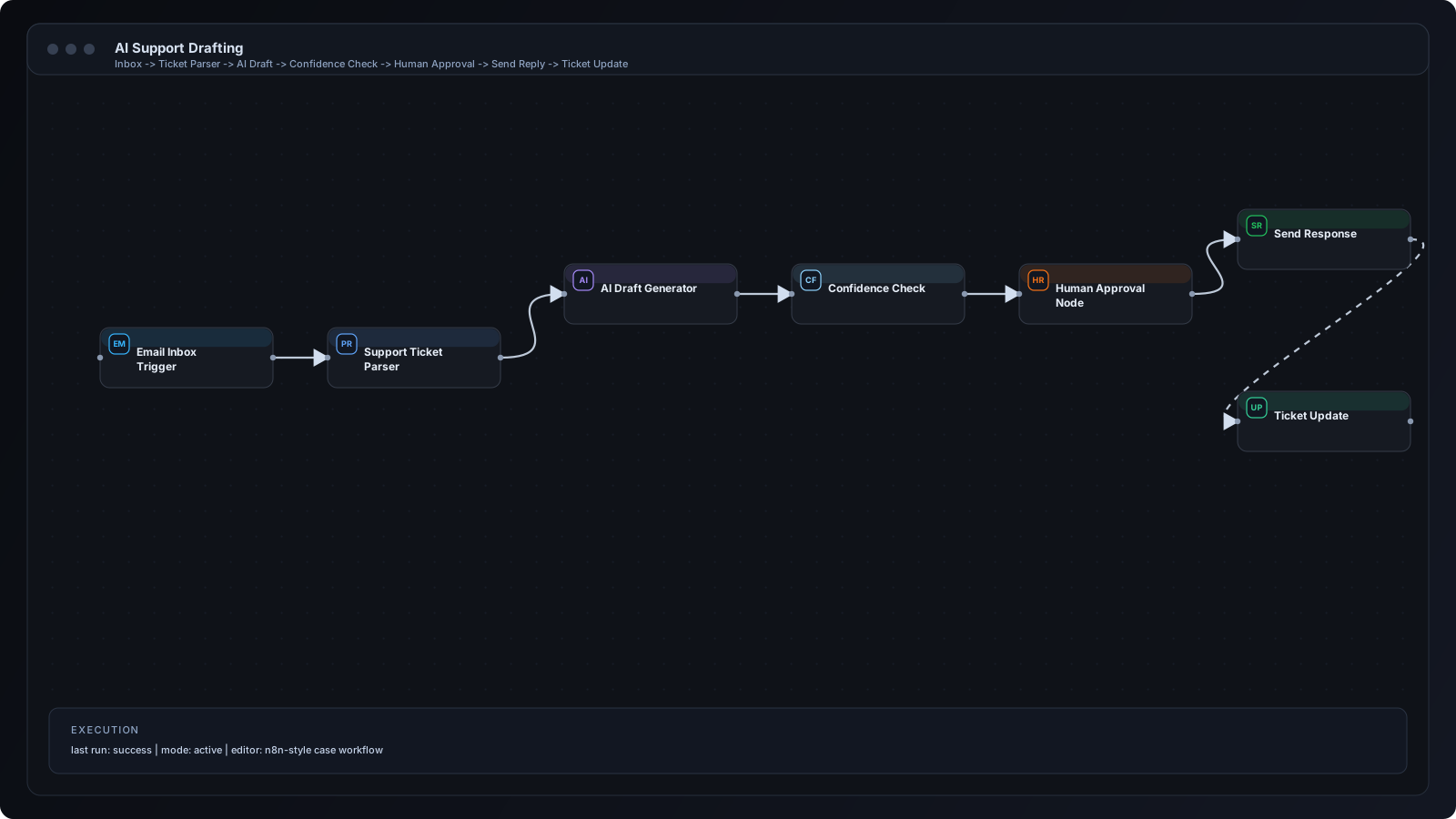
Step 1: Trigger on inbound email or ticket event. Step 2: Parse subject, intent, account metadata, and conversation history. Step 3: Generate AI draft with guardrails and response templates. Step 4: Evaluate confidence and risk category. Step 5: Route to reviewer channel with Approve/Edit/Reject actions. Step 6: Send approved response via support channel. Step 7: Update ticket state and record full audit trail.
Email/Gmail trigger nodes ingest new messages. Function nodes prepare prompt context and policy constraints. OpenAI node drafts responses. IF/Switch nodes branch high-risk categories to specialist queues. Slack or Telegram approval nodes capture reviewer decision. Send nodes dispatch final approved messages, and data-store nodes persist logs.
SaaS customer support for billing and onboarding tickets. Agency client support with multilingual reply drafts. Marketplace support teams handling order-related inquiries. Internal IT helpdesk triage with escalation policies.
Teams often skip explicit policy constraints in prompts, causing unsafe draft suggestions. Another issue is approving without visibility into source context. Many implementations also fail to capture decision logs, making QA and compliance review difficult.
Use standardized response templates and brand-tone guardrails. Include customer context and ticket metadata in approval payloads. Set confidence thresholds and auto-route low-confidence drafts to manual handling. Track reviewer edits as feedback signals for prompt improvement.
Add queue-based assignment by product line, language, and severity. Introduce specialist branches for legal, security, or financial cases. Build reusable sub-workflows for shared parsing and policy checks so new queues can be launched quickly.
Mask sensitive customer fields in logs and notifications. Apply least-privilege API credentials for all integration nodes. Keep approval events immutable for audit requirements. Define retention and deletion policies for support transcripts and generated drafts.
Q: Can AI send messages automatically? A: It can, but for most teams a human approval gate is safer. Q: How much time can this save? A: Many teams reduce draft time by 40-70%. Q: Can this work with chat and email together? A: Yes, via channel-specific trigger and send nodes. Q: How do we improve model quality over time? A: Feed approved edits and rejection reasons into prompt refinement cycles.
AI-assisted support works best when automation and human review are intentionally combined. n8n makes it possible to operationalize this pattern with confidence checks, approval routing, and traceable outcomes. The result is faster support without sacrificing trust.
n8n Workflows
Automation
Automation