


CRM & Lead Systems
CRM basics: from forms to pipeline
Mar 3, 202614 min
CRM & Lead Systems
Many companies invest in CRM but still operate with inconsistent pipeline data. The missing piece is workflow design between form submission and stage progression. This guide explains how to build a reliable forms-to-pipeline system with automation guardrails.
When form data enters CRM without validation and ownership logic, records become inconsistent quickly. Sales teams then mistrust dashboards and rely on manual updates. Forecasting quality drops because stage transitions do not reflect reality.
Automation enforces field standards, lead qualification rules, and routing policies every time data enters CRM. It also records stage updates and handoff events consistently. This creates higher confidence in pipeline analytics and operational decisions.
Reference flow: Form Trigger -> Field Validation -> Data Formatter -> Duplicate Check -> CRM Upsert -> Owner Assignment -> Stage Rules -> Notification + Log. The architecture separates data quality checks from business routing logic for easier debugging.
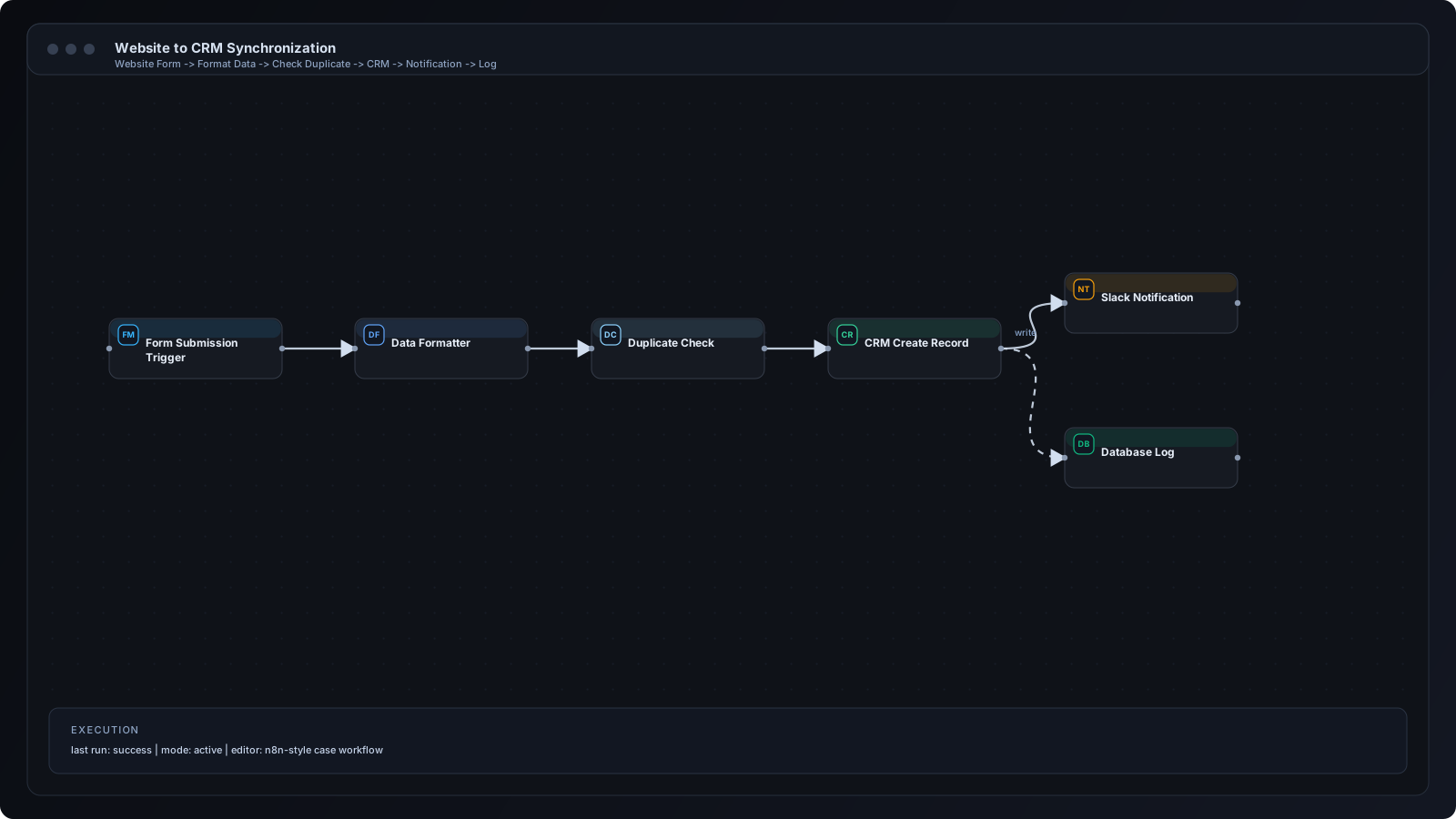
Step 1: Capture incoming form payloads through webhook trigger. Step 2: Validate required fields and normalize naming conventions. Step 3: Detect duplicates using deterministic keys. Step 4: Upsert contact/deal entities in CRM. Step 5: Assign owner based on territory, source, or queue load. Step 6: Apply stage entry criteria. Step 7: Notify team and write execution log.
Webhook and Set nodes handle ingestion and normalization. IF/Switch nodes enforce qualification and routing policies. CRM nodes perform idempotent create/update operations. Telegram/Slack nodes deliver assignment alerts. Data-store nodes preserve audit history for lifecycle analysis.
Agency inbound forms to HubSpot deals. B2B demo requests with territory-based owner assignment. Franchise lead routing by location. Marketplace seller applications with qualification scoring.
Missing duplicate controls create fragmented customer history. Overly broad stage definitions inflate pipeline quality artificially. Teams often notify owners without enforcing SLA tracking, leading to silent drop-offs after assignment.
Define a canonical data contract for inbound forms. Use idempotent upserts and explicit stage transition rules. Attach owner SLA clocks to each assignment event. Build weekly pipeline hygiene jobs for stale-stage review.
As volume grows, split intake by product line and market segment. Add enrichment layers before scoring to improve assignment quality. Move from static assignment to capacity-aware routing. Introduce exception queues for ambiguous records.
Restrict webhook access and validate request signatures. Encrypt credentials and rotate CRM API tokens. Limit sensitive field exposure in alerts and logs. Keep audit records for compliance and incident investigation.
Q: What is the most important first step? A: Define required fields and duplicate prevention policy. Q: Can this work with any CRM? A: Yes, with proper field mapping and API capabilities. Q: How often should pipeline hygiene run? A: Daily checks for fast-moving teams; weekly minimum for smaller teams. Q: Do we need custom code? A: Many flows are no-code, but custom logic helps with advanced routing.
CRM performance depends less on the tool itself and more on workflow discipline. Automating forms-to-pipeline transitions creates cleaner data, faster ownership, and more reliable forecasting. Start with validation and routing, then scale into advanced lifecycle automation.
n8n Workflows
Automation
AI for Business