


Form to CRM sync speed
Before: Manual / delayed
After: Instant
Near real-time
Smoother lead pipeline
Redesigned form handling and connected submissions to CRM + team notifications.
Form to CRM sync speed
Before: Manual / delayed
After: Instant
Near real-time
Operational workload
Before: High manual effort
After: Automated handoff
-50%+
Pipeline visibility
Before: Limited
After: Live visibility
Improved tracking
Section 1 - Client Problem
Section 2-3 - Context and Goal
An agency relied heavily on inbound website traffic and needed deterministic form-to-CRM synchronization for lead handling SLAs.
Create a seamless website-to-CRM pipeline with validation, owner assignment, and internal alerts.
Section 4-5 - Workflow and Architecture
Synchronous intake layer with asynchronous team alerting and operational visibility.
Recommended diagram: Website Form -> Webhook -> Validation -> HubSpot Sync -> Telegram Notification -> KPI Dashboard Update.
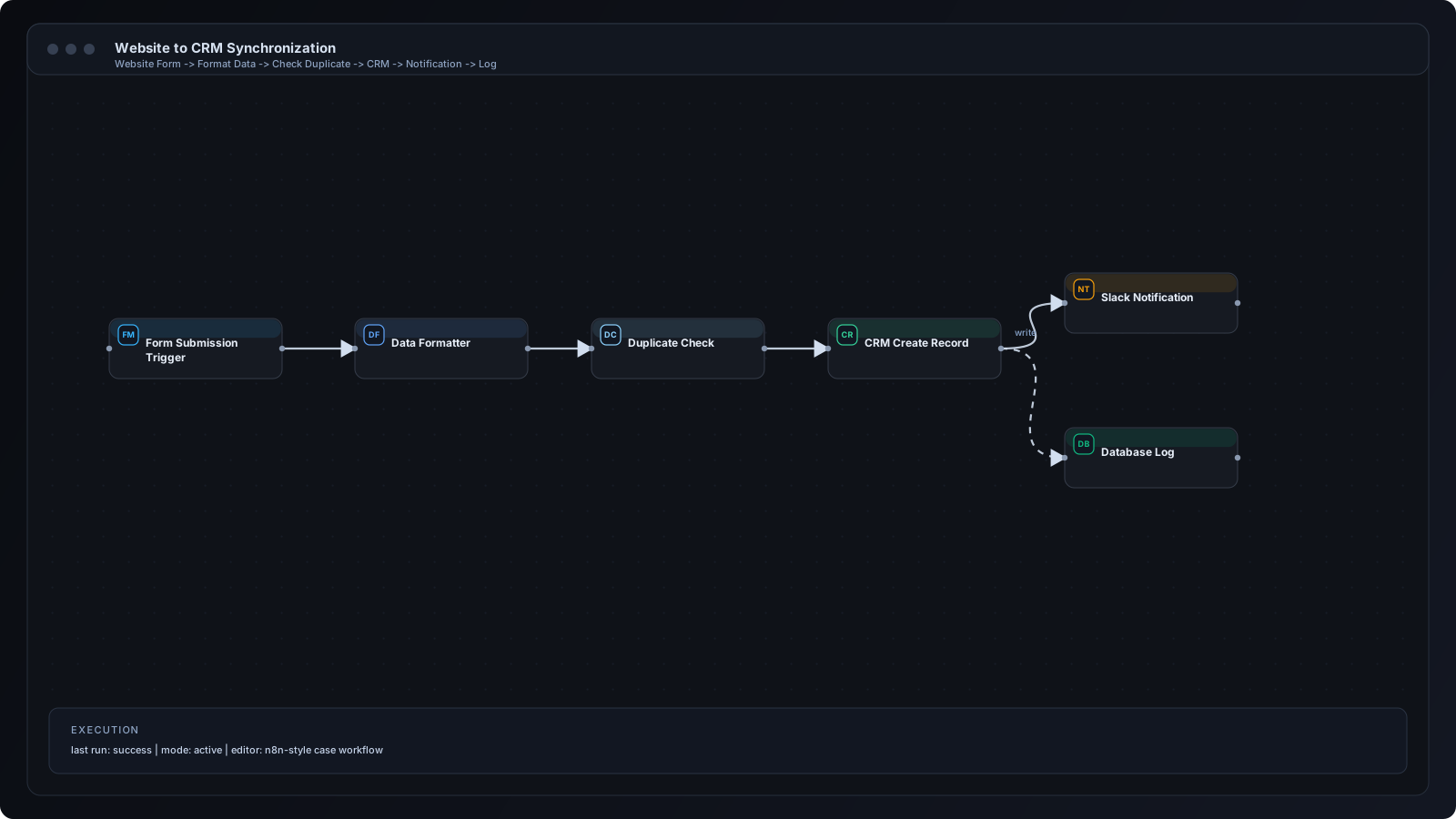
Section 6 - Step by Step Workflow
Step 1
Visitor submits website form.
Step 2
Webhook endpoint receives payload.
Step 3
Validation checks required fields and source tracking parameters.
Step 4
HubSpot contact and deal are created or updated.
Step 5
Lead owner is auto-assigned by routing rules.
Step 6
Telegram alert is sent to operations channel.
Step 7
Google Sheets dashboard updates KPI counters.
Section 7 - n8n Breakdown
Webhook Node
Collects form submissions with UTM metadata.
IF Validation Node
Rejects malformed submissions and logs errors.
HubSpot Node
Maintains contact and deal consistency.
Telegram Node
Notifies team about new qualified leads.
Google Sheets Node
Updates operations reporting view.
Error Trigger Node
Handles retries and failure notifications.
Integration icons and tooling used in this implementation.
 Webhooks
 HubSpot
 Telegram
 Google Sheets
Section 8 - Results and Metrics
| Metric | Before | After | Impact |
|---|---|---|---|
| Form to CRM sync speed | Manual / delayed | Instant | Near real-time |
| Operational workload | High manual effort | Automated handoff | -50%+ |
| Pipeline visibility | Limited | Live visibility | Improved tracking |
Section 9 - Implementation Challenges
Introduced centralized field-map object with strict typing and fallback defaults.
Added score threshold checks and anti-spam filtering before CRM write operations.
Implemented idempotency keys and dedupe checks prior to alert dispatch.
Section 10 - Lessons Learned
Section 11 - FAQ
Yes. Additional entry points can map into the same canonical intake workflow.
Yes. Spam filters can run before CRM sync and owner assignment.
HubSpot, Salesforce, Pipedrive, and custom API-connected systems are supported.
Yes. Field mapping and messaging can be configured per language.
Share your workflow stack and current bottlenecks. We will design a practical automation architecture with implementation priorities.