


Draft preparation time
Before: 20-30 min
After: 5-10 min
-60%
Faster draft cycle
Added AI draft generation with human approval checkpoints in Slack.
Draft preparation time
Before: 20-30 min
After: 5-10 min
-60%
Support queue pressure
Before: High
After: Moderate
Improved throughput
Quality control
Before: Inconsistent
After: Human-approved
Stable quality
Section 1 - Client Problem
Section 2-3 - Context and Goal
A digital services company needed faster support throughput without risking brand tone, accuracy, or compliance in outbound communication.
Use AI to draft responses instantly, then route drafts to human approvers before messages are sent to customers.
Section 4-5 - Workflow and Architecture
AI-assisted drafting with a strict human-in-the-loop gate, escalation routing, and full activity logging.
Recommended diagram: Inbox Trigger -> Context Builder -> OpenAI Draft -> Risk Check -> Human Approval -> Send Reply -> Audit Log.
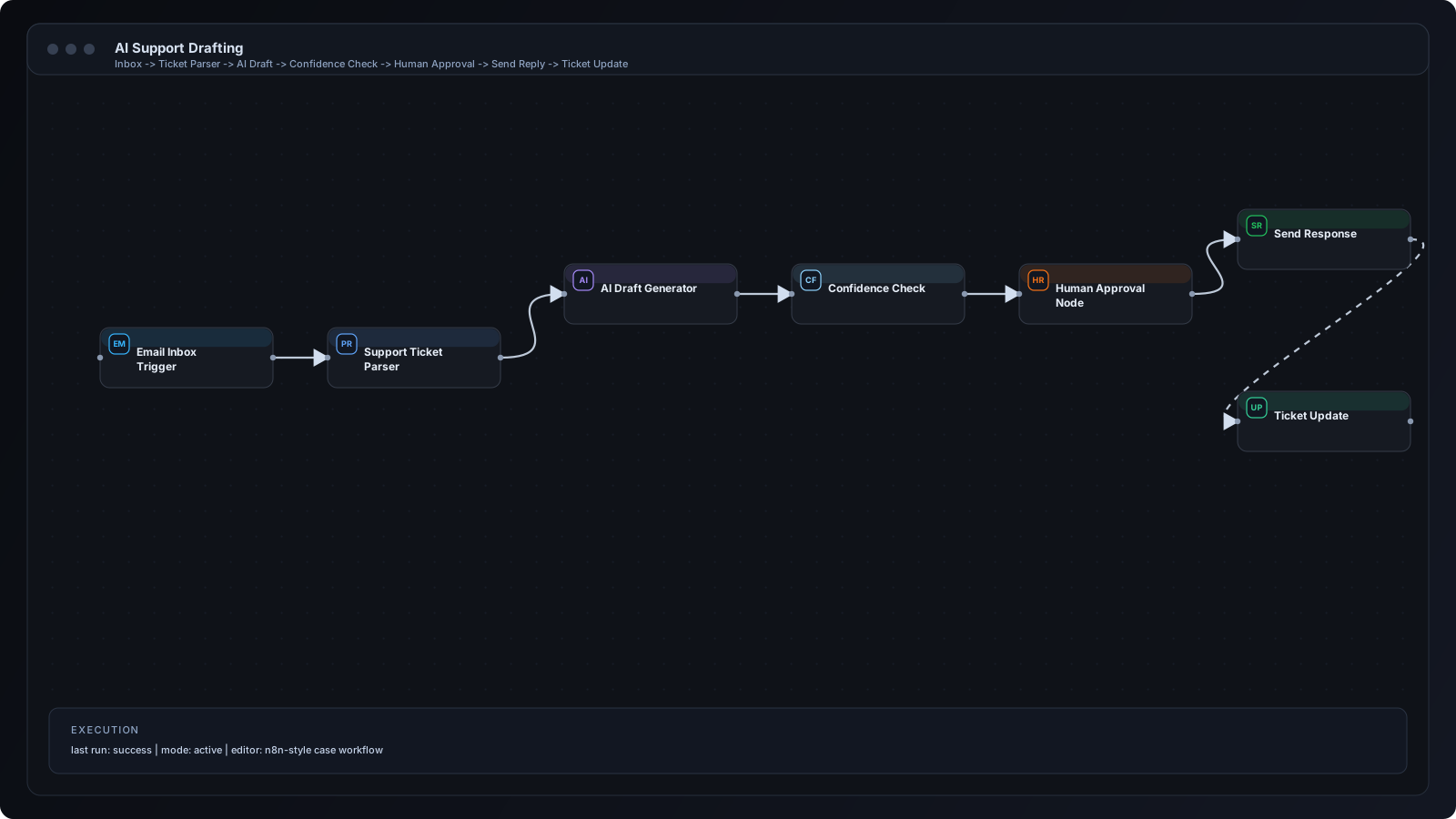
Section 6 - Step by Step Workflow
Step 1
New support email enters shared inbox.
Step 2
n8n parses customer metadata, history, and issue category.
Step 3
Risk classifier checks whether the ticket can be auto-drafted.
Step 4
OpenAI generates a reply draft with policy constraints.
Step 5
Draft is posted to Slack with Approve/Edit/Reject actions.
Step 6
Agent approves or edits response content.
Step 7
Approved response is sent through Gmail.
Step 8
Ticket status and transcript are logged for QA review.
Section 7 - n8n Breakdown
Gmail Trigger Node
Detects inbound support thread events.
Function + Set Nodes
Builds prompt context and metadata package.
OpenAI Node
Generates draft response with guardrails.
IF Node
Routes high-risk categories to manual-only queue.
Slack Node
Requests approval with action buttons.
Gmail Send Node
Sends only approved message versions.
Data Store Node
Stores final output and approval trace.
Integration icons and tooling used in this implementation.
 Zapier
 Gmail
Gmail OpenAI
 Slack
SlackSection 8 - Results and Metrics
| Metric | Before | After | Impact |
|---|---|---|---|
| Draft preparation time | 20-30 min | 5-10 min | -60% |
| Support queue pressure | High | Moderate | Improved throughput |
| Quality control | Inconsistent | Human-approved | Stable quality |
Section 9 - Implementation Challenges
Added response templates and tone guardrails before final approval stage.
Introduced policy-based branch routing that bypasses AI send path for sensitive categories.
Displayed source context and confidence markers in approval message payload.
Section 10 - Lessons Learned
Section 11 - FAQ
No. This workflow requires human approval before any customer-facing response is sent.
Yes. The same logic can be extended to WhatsApp, Telegram, or in-app chat.
Initial rollout was completed in about 2 weeks including training and QA.
Agents can reject drafts and route examples into prompt improvement cycles.
Share your workflow stack and current bottlenecks. We will design a practical automation architecture with implementation priorities.