


Lead response time
Before: 2-4 hours
After: 10-20 minutes
-90%
Lower risk of missed leads
Built lead intake workflow with validation, CRM sync, and Telegram notifications.
Lead response time
Before: 2-4 hours
After: 10-20 minutes
-90%
Lead loss risk
Before: High
After: Low
Major reduction
Data consistency
Before: Fragmented
After: Unified
High confidence
Section 1 - Client Problem
Section 2-3 - Context and Goal
A growth-focused service business was scaling ad spend and needed a reliable handoff process between marketing and sales teams across multiple lead channels.
Build an automated lead intake and routing system that validates data, updates CRM, prioritizes urgent leads, and notifies the right salesperson instantly.
Section 4-5 - Workflow and Architecture
Event-driven webhook intake with deterministic validation, CRM upsert, lead-priority logic, and multi-channel team alerts.
Recommended diagram: Lead Source -> Webhook -> Validation -> Deduplication -> HubSpot -> Telegram Alert -> Email Confirmation -> Follow-Up Check.
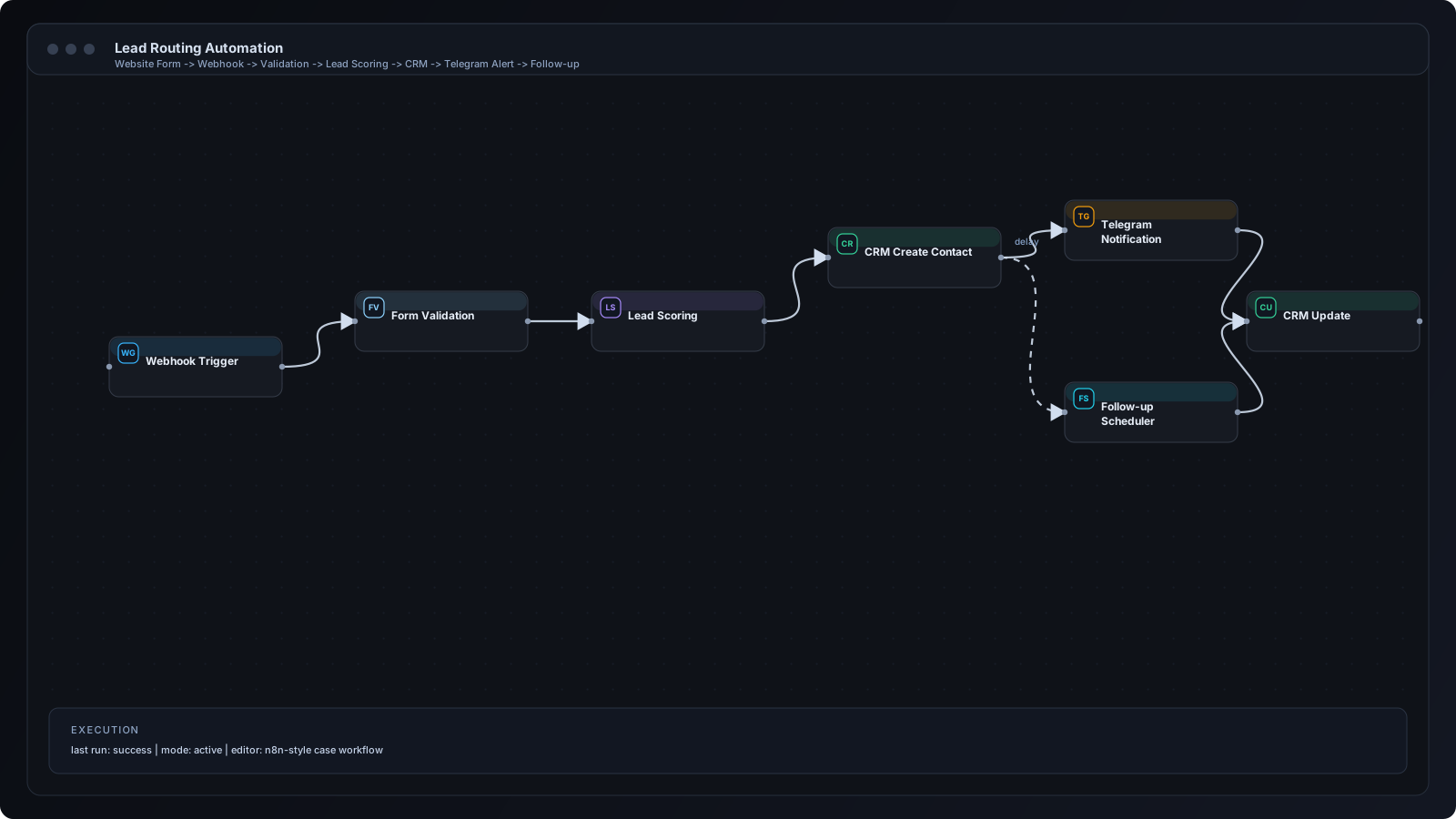
Section 6 - Step by Step Workflow
Step 1
Lead enters from website form or chat widget.
Step 2
Payload is sent to n8n webhook endpoint.
Step 3
Validation node checks required fields and contact format.
Step 4
Deduplication node compares against existing CRM contacts.
Step 5
Lead score is calculated from source, intent, and company fields.
Step 6
HubSpot contact and deal records are created or updated.
Step 7
Telegram alert is sent to the correct sales channel.
Step 8
Auto-response email confirms lead receipt.
Step 9
If no owner action is detected, follow-up reminder is scheduled.
Section 7 - n8n Breakdown
Webhook Trigger
Receives lead payload from form and chat endpoints.
IF Validation Node
Routes invalid payloads to error handling and logging.
Function Node
Normalizes fields and computes lead score.
HubSpot Node
Creates or updates contact and deal entities.
Telegram Node
Posts high-context lead alerts to sales channel.
Email Node
Sends instant lead confirmation with expected response SLA.
Wait/Delay Node
Schedules follow-up reminders for unassigned leads.
Integration icons and tooling used in this implementation.
 n8n
n8n HubSpot
 Airtable
 Telegram
Section 8 - Results and Metrics
| Metric | Before | After | Impact |
|---|---|---|---|
| Lead response time | 2-4 hours | 10-20 minutes | -90% |
| Lead loss risk | High | Low | Major reduction |
| Data consistency | Fragmented | Unified | High confidence |
Section 9 - Implementation Challenges
Introduced deterministic dedupe key strategy using normalized email and phone hash before upsert.
Added a mapping function layer to canonicalize fields before validation.
Applied lead scoring rules and conditional routing to channel-specific Telegram threads.
Section 10 - Lessons Learned
Section 11 - FAQ
The first production version was delivered in 8 business days including testing and rollout.
Yes. Queue-based retries and idempotent CRM upserts support high-volume bursts safely.
Yes. Routing logic can split by geography, service type, campaign source, or team capacity.
Transport is encrypted, credentials are stored as secrets, and error logs avoid sensitive fields.
Share your workflow stack and current bottlenecks. We will design a practical automation architecture with implementation priorities.